
The Out of Policy Report provides a comprehensive view of all travel bookings that fall outside your company's defined travel policies. This enhanced report offers instant visibility, allowing you to easily schedule recurring deliveries or download real-time data on demand.
Table of Contents
Prerequisites
To proceed, you need:
- An active ITILITE account.
- Access as a Travel Administrator or Finance User.
Interactive Guide
Follow these steps to download and schedule your Out of Policy Report:
To download your report:
- Log in to your ITILITE account(admin) and navigate to the Reports section under the Finance menu. Then, select the Out of Policy Report.
- Click on the Start Date field to open the calendar and select your desired start date for the reporting period.
- Select the end date for your report. Once the date range is set, you can download the report.
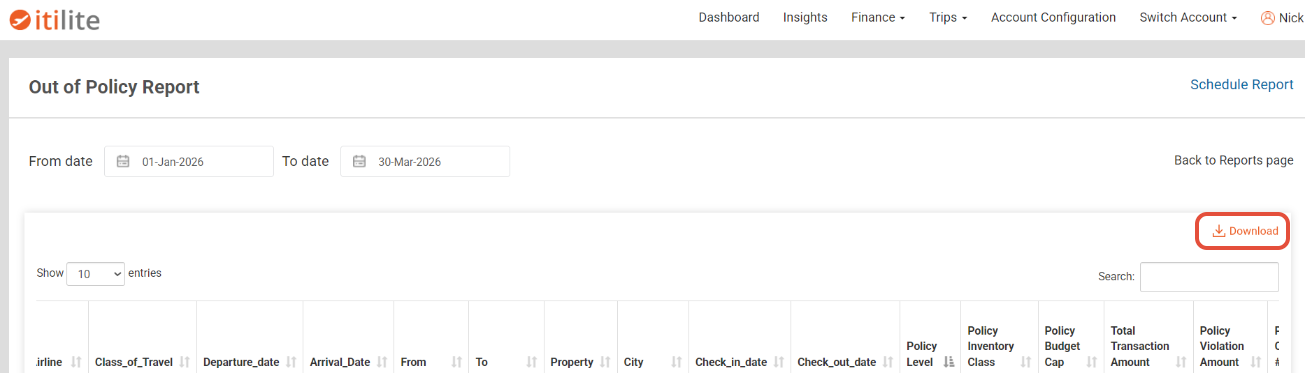
To schedule a report:
Click on "Schedule Report". Choose the desired frequency for your scheduled report (e.g., daily, weekly, monthly) and enter the start date for the schedule to begin.
- Enter the email address(es) of the recipient(s) in the Email To field. Finally, click the Schedule button to confirm your report schedule.
Pro-Tips & Guardrails
Verification & FAQs
After scheduling, you will receive the report in your inbox at the specified frequency. For on-demand reports, a file download will begin in your browser once the report is generated.
A: The report includes all out-of-policy transactions, covering both initial bookings and any subsequent modifications or cancellations that were out of policy.
Q: What does "Policy Level" in the report signify?
A: "Policy Level" indicates whether the policy was applied based on the person who created the trip (Booker) or the person traveling (Traveler). If the trip creator and traveler are the same, it's a "Booker" level policy; otherwise, it's a "Traveler" level policy.
Q: Can I download the report immediately instead of scheduling it?
A: Yes, after selecting your date range, you can choose to download the report on demand for real-time compliance data. Look for a "Download Report" or "Run Report" option.
Q: Who can access the Out of Policy Report?
A: This report is available to Travel Administrators and Finance Users within the ITILITE platform.
Was this article helpful?
That’s Great!
Thank you for your feedback
Sorry! We couldn't be helpful
Thank you for your feedback
Feedback sent
We appreciate your effort and will try to fix the article