
Whether a project was postponed or your schedule simply cleared up, canceling a flight shouldn't be a source of frustration. On ITILITE, we’ve made the cancellation process transparent and efficient, ensuring you can manage your bookings with confidence and ease.
Table of Contents
Step-by-Step Guide
Follow these steps to cancel your flight booking:
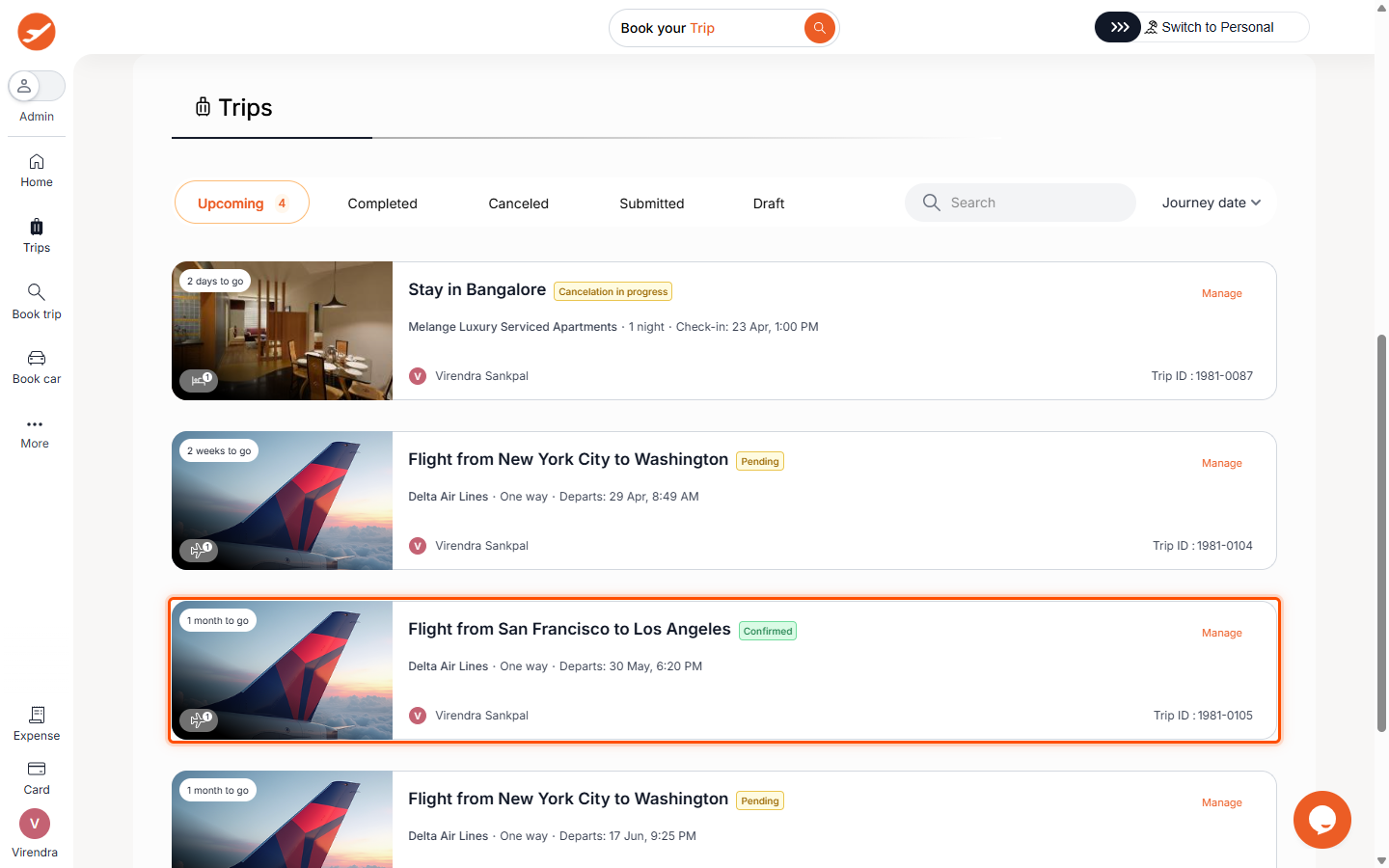
- From your ITILITE Dashboard, navigate to Trips.
- Locate the specific flight booking you wish to cancel in your 'Upcoming' trips list and click the Manage button.
- On the trip details page, find the 'Change in plans' section and click the Cancel booking option.
- Select the specific flight leg(s) or passenger(s) you want to cancel from the available options. Then, click the Review cancellation button.
- Review the cancellation details, including the booking amount, non-refundable charges, cancellation charges (penalty), and the net refund amount. Once you are ready, click the Confirm cancellation button to finalize your request.
- After confirmation, you will see a final status update regarding your cancellation request.
Pro-Tips & Guardrails
NOTE: Once a cancellation request is initiated, it is not reversible. Please review all details carefully before confirming.
PRO-TIP: Most airlines offer a "void window" (typically 24 hours after booking) during which you can cancel without penalty. After this window, standard cancellation charges may apply based on the fare rules.
NOTE: For bundled fares (like multi-city or round-trip packages), partial cancellation of a single flight leg might not be supported through automated processes and may require manual assistance from the ITILITE support team.
Verification & FAQs
After confirming your cancellation, you should see a success message on the platform. You will also receive an email with details about the cancellation status and any applicable refund amount.
A: If the cancellation is processed automatically, you will see a success message. If manual intervention is required, the status may show "cancellation in progress." You will receive an email confirming the cancellation and details about any refund.
Q: Can I partially cancel a flight booking (e.g., one leg of a round trip or one passenger)?
A: Yes, partial cancellation of specific flight legs or passengers is supported if allowed by the airline and fare rules. For certain complex bookings like bundled fares, partial cancellation might require manual assistance from ITILITE support.
Q: Will I incur cancellation charges?
A: Cancellation charges depend on the airline's fare rules and the timing of your cancellation. Many bookings allow free cancellation within a "void window" (typically 24 hours). After this, a penalty may apply. All charges and refund amounts will be displayed for your review before you confirm.
Q: What is a "void window"?
A: The void window is a period, usually 24 hours after booking, during which you can cancel your flight without incurring any cancellation penalties, resulting in a full refund.
Q: What if cancellation charges or refund details are not available when I try to cancel?
A: If the platform indicates that cancellation charges are unavailable, you can still proceed with the cancellation. In such cases, the ITILITE support team will handle your request manually and communicate the details to you. If an automated cancellation fails for any reason, our support team will also reach out to assist.
Was this article helpful?
That’s Great!
Thank you for your feedback
Sorry! We couldn't be helpful
Thank you for your feedback
Feedback sent
We appreciate your effort and will try to fix the article