
Ever wonder why your hotel search on ITILITE sometimes shows a concise list of options? ITILITE is designed to intelligently curate and present the most relevant, policy-compliant hotels, ensuring you find the best fit for your business travel quickly.
Table of Contents
Step-by-Step Guide
Follow these steps to perform a hotel search and understand how ITILITE presents your options:
- Access the ITILITE Dashboard. Begin by logging into your ITILITE account to access your personalized dashboard.
- Enter Your Destination. In the hotel search bar, type your desired destination. As you type, ITILITE will provide a dropdown list of matching locations. Select the correct destination to ensure accurate search results.
- Initiate Your Search. After entering your destination and selecting your dates, click the Search button. ITILITE will then process your request and display a curated list of hotel options tailored to your needs and company policy.
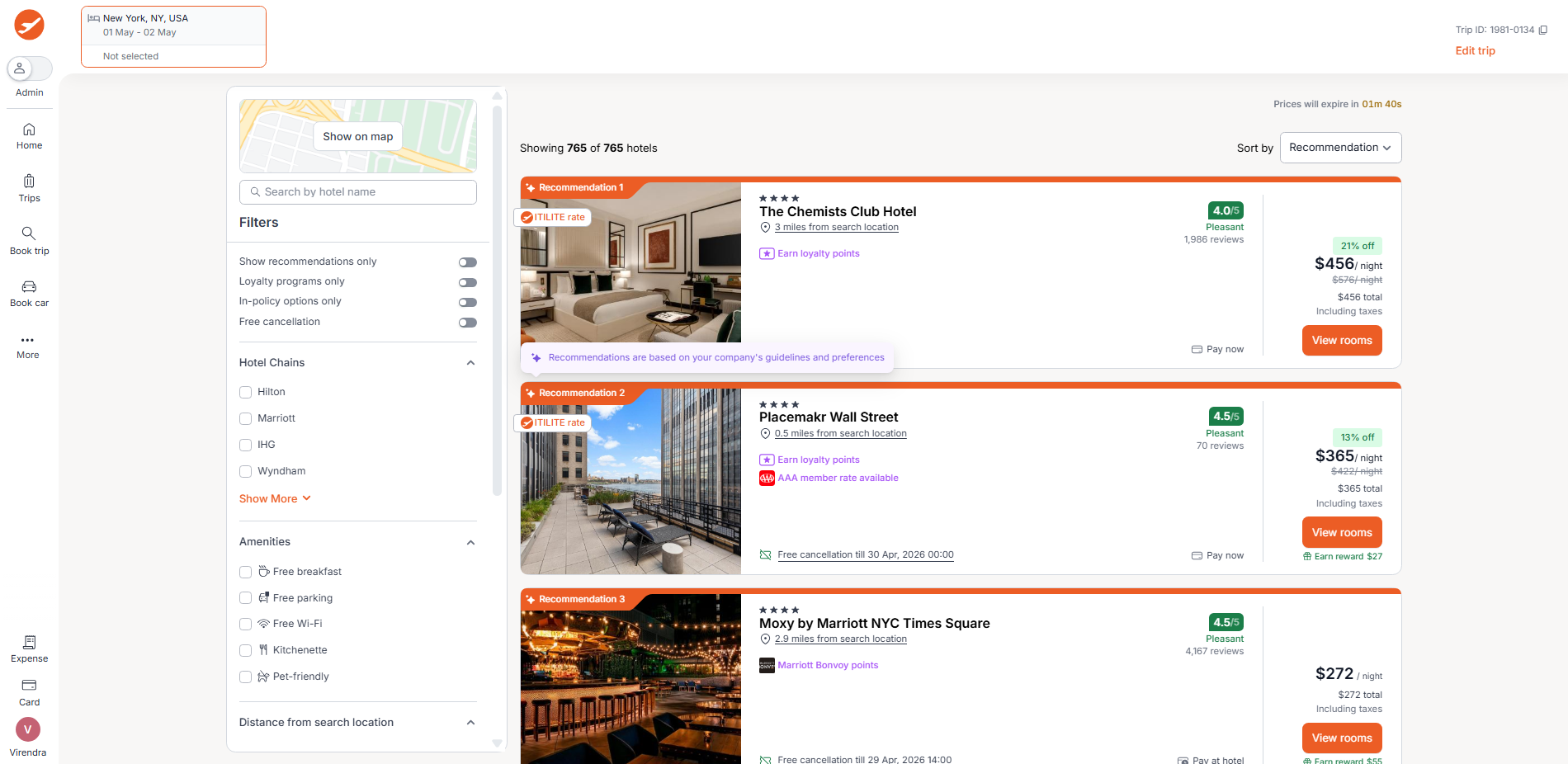
- Understand Your Hotel Options. Upon searching, you might notice a focused selection of hotels. This is by design, as ITILITE prioritizes showing you the most relevant and policy-compliant options first, often highlighting the top 3 recommended hotels (R1, R2, R3) based on factors like distance, rating, and price within your company's guidelines.
Verification & FAQs
After reviewing the information below, you'll have a clear understanding of why ITILITE presents hotel options in a streamlined manner, empowering you to adjust your search and filters effectively to find the perfect stay.
Q: My company has a specific hotel policy. How does that affect my search results?
A: Your company's hotel policy, including rules for maximum star rating, minimum guest rating, nightly budget caps, and preferred or blocked hotels, significantly influences the results. Hotels that don't meet these criteria are often filtered out by default to ensure compliance.
Q: I've applied several filters, and now I see very few hotels. Why is this happening?
A: Combining multiple filters such as specific hotel chains, loyalty programs, amenities, payment types, or "free cancellation" can significantly narrow down the available options. ITILITE persists these filters, so they continue to affect your search until you clear them.
Q: What if a hotel I know exists isn't showing up? Could it be sold out?
A: Yes, if a hotel is genuinely sold out for your selected dates, it will not appear in the default search results. To see sold-out properties, you can often enable a Show sold-out properties toggle on the results page, which will display them clearly marked as unavailable.
Q: How can I see more hotel options if the initial list is too limited?
A: To view more options, try relaxing or clearing some of your active filters, such as Show recommendations only or In-policy options only. You can also increase the distance radius in your search settings or explore the full list of hotels by clicking an Explore More link if available.
Was this article helpful?
That’s Great!
Thank you for your feedback
Sorry! We couldn't be helpful
Thank you for your feedback
Feedback sent
We appreciate your effort and will try to fix the article