
Ensuring your Known Traveler Number (KTN) or TSA PreCheck number is on your travel bookings can significantly streamline your airport experience, and ITILITE makes it straightforward to add this important detail to your profile and flights.
Table of Contents
- What is KTN/TSA Pre-Check and Redress Numbers
- Adding Your KTN/TSA PreCheck Number
- Pro-Tips & Guardrails
- Verification & FAQs
What is KTN/TSA Pre-Check and Redress Numbers
While these numbers are all entered in the same section of your profile, they serve entirely different purposes. Here is a quick breakdown to help you identify which number you have:
1. KTN (Known Traveler Number) / TSA PreCheck
What it is: A unique 9 or 10-character ID issued by the U.S. government (TSA or Department of Homeland Security) to approved travelers.
What it does: It grants you access to expedited security lanes at U.S. airports, allowing you to keep your shoes, belts, and light jackets on, and leave laptops in your bag.
Where to find it: If you applied directly for TSA Pre-Check, your KTN typically starts with
TT,TE, orAC. If you have Global Entry, your KTN is the 9-digit PASS ID located on the back of your physical Global Entry card.Note: This is entirely separate from airline frequent flyer or loyalty rewards numbers.
2. Redress Number
What it is: A unique 7-digit numeric code issued by the Department of Homeland Security (DHS) TRIP program.
What it does: This is not a rewards or expedited security program. It is exclusively for travelers who regularly face extra, mistaken screening delays at the airport; usually because their legal name matches someone on a government watch list. The Redress number solves this misidentification.
Where to find it: This will be explicitly labeled as a "Redress Control Number" on official correspondence from the DHS if you filed a case with them. If you have never had issues with mistaken identity at airport security, you likely do not have or need a Redress number.
Adding Your KTN/TSA PreCheck Number
You can add your KTN or TSA PreCheck number using one of these methods:
- Through Your Traveler Profile: The most permanent way to add your KTN/TSA PreCheck number is directly within your ITILITE traveler profile settings. Once you navigate to your profile, look for the membership or loyalty details section, where you can input and save your number. This ensures it's stored for all future bookings.
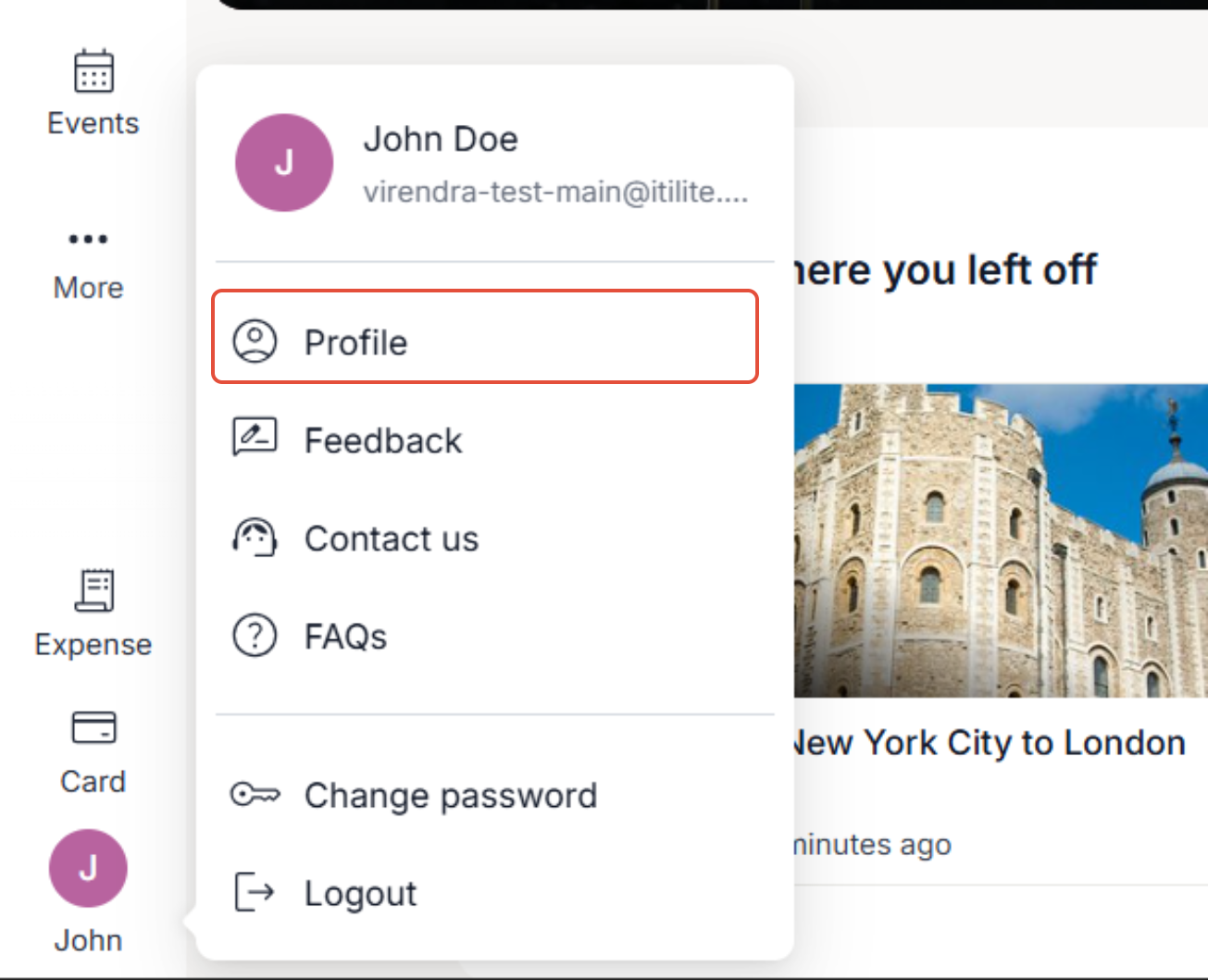
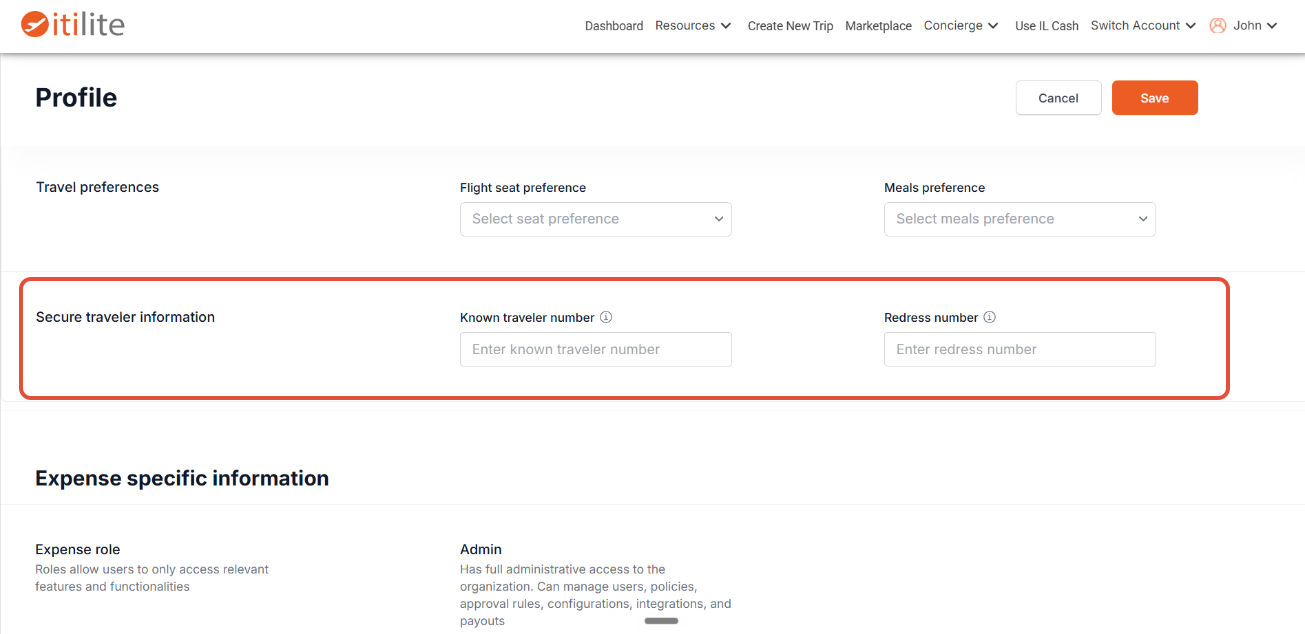
- On the Flight Confirmation Page: When you're in the process of booking a flight, the confirmation page provides an opportunity to add or edit your KTN/TSA PreCheck number before you finalize your booking.
Once your KTN/TSA PreCheck number is successfully saved in your profile, ITILITE will automatically populate it on the flight confirmation page for all your subsequent flight bookings. This means you won't have to manually enter it each time you travel, making your booking process even faster and more efficient.
Pro-Tips & Guardrails
If you encounter an issue when adding your KTN/TSA details, it could be due to a mismatch in your traveler name or date of birth, an expired membership, or invalid details; but you can still choose to proceed with your booking without these details.
Verification & FAQs
Once your KTN/TSA PreCheck number is successfully added and your booking is complete, you will see this information reflected on your booking details within ITILITE. Additionally, your KTN/TSA details will be printed on your travel voucher or itinerary, providing clear confirmation for your journey.
A: A Known Traveler Number (KTN) is issued to individuals who have completed a background check through programs like TSA PreCheck or Global Entry. It allows travelers to receive expedited screening at U.S. airports, making the security process quicker and more convenient.
Q: Will my KTN/TSA number be saved for future bookings?
A: Yes, absolutely! Once you add your KTN/TSA PreCheck number to your ITILITE traveler profile or during a flight booking, it is permanently saved. For all future flight bookings, this number will automatically populate on the confirmation page, saving you time and effort.
Q: What if my KTN/TSA number isn't appearing on my booking?
A: If your KTN/TSA number isn't showing up, first ensure it's saved in your ITILITE traveler profile. Common reasons for it not appearing or failing to apply include a mismatch between the name or date of birth on your booking and your KTN record, or an expired membership. You can always re-enter or update it on the flight confirmation page.
Q: Is it mandatory to add my KTN/TSA number to book a flight?
A: No, adding your KTN/TSA PreCheck number is not mandatory for completing a flight booking on ITILITE. While it offers significant benefits for airport security, you can still successfully book and travel without providing these details.
Q: Can a Central Booker add KTN/TSA details for me?
A: Yes, if your organization uses a Central Booker, they can add your KTN/TSA PreCheck details on your behalf during the flight booking process on the confirmation page. Once added, these details will be saved to your traveler profile for future use.
Was this article helpful?
That’s Great!
Thank you for your feedback
Sorry! We couldn't be helpful
Thank you for your feedback
Feedback sent
We appreciate your effort and will try to fix the article